HDMI sound via ATI graphics card: Difference between revisions
From WickyWiki
No edit summary |
No edit summary |
||
| Line 13: | Line 13: | ||
<blockquote> | <blockquote> | ||
[[File:SoundSettings.png| | [[File:SoundSettings.png|600px|link=]] | ||
</blockquote> | </blockquote> | ||
Revision as of 08:19, 1 July 2013
The HDMI sound device might not be detected automatically when booting the computer without the television connected. I hope this instruction will help you to make sure the drivers are always loaded.
The easiest way:
- Turn TV on
- Reboot
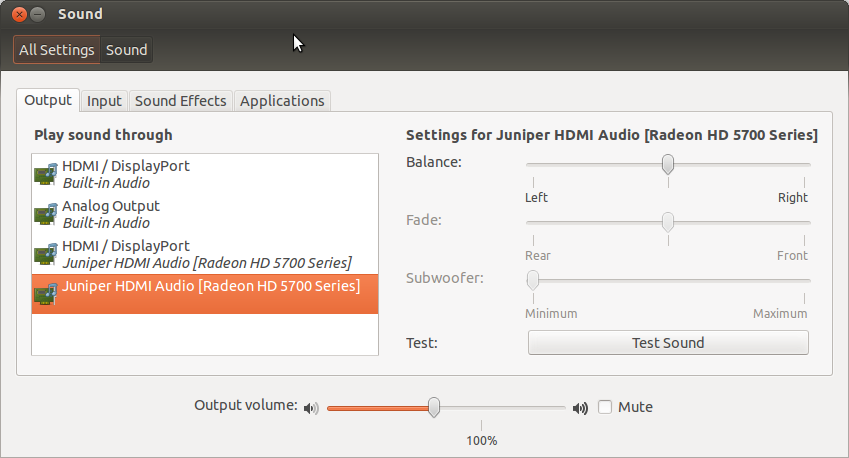
Open sound settings:
First find your HDMI sound device, in this case card 1, device 3:
aplay -l
**** List of PLAYBACK Hardware Devices ****
...
card 1: Generic [HD-Audio Generic], device 3: HDMI 0 [HDMI 0]
  Subdevices: 1/1
  Subdevice #0: subdevice #0
Modify the following file to force-load the driver:
sudo gedit /etc/pulse/default.pa
Insert a line after module-alsa-sink, use option 1,3 for card 1 and device 3:
...
#load-module module-alsa-sink
#20130701,wjv force load HDMI sound driver card 1, device 3:
load-module module-alsa-sink device=hw:1,3
...
Reboot your system.
Test with aplay or with speaker-test (card 1, device 3):
aplay -D plughw:1,3 ~/Scripts/other/alarm.wav
speaker-test -c 2 -r 48000 -D hw:1,3
Make sure the card is not muted:
sudo apt-get install gnome-alsamixer
alsamixer
- F6 to select the device
- M to mute/unmute
