HDMI sound via ATI graphics card: Difference between revisions
From WickyWiki
No edit summary |
No edit summary |
||
| Line 3: | Line 3: | ||
[[Category:201307]] | [[Category:201307]] | ||
== Quick repair == | |||
* https://bugs.launchpad.net/ubuntu/+source/fglrx-installer/+bug/1001842 | |||
# | The HDMI sound device is disabled when the television is turned off. | ||
# | |||
Workaround 1: | |||
<syntaxhighlight lang=bash> | |||
xrandr -display :0 --output DFP2 --off | |||
xrandr -display :0 --output DFP2 --auto | |||
</syntaxhighlight> | |||
Workaround 2: | |||
# Go to terminal CTRL+SHIFT+F1 | |||
# Back to Unity CTRL+SHIFT+F7 / 8 | |||
Open ''sound settings'', you should see an HDMI Audio device here: | Open ''sound settings'', you should see an HDMI Audio device here: | ||
| Line 15: | Line 26: | ||
[[File:SoundSettings.png|600px|link=]] | [[File:SoundSettings.png|600px|link=]] | ||
</blockquote> | </blockquote> | ||
== Testing HDMI audio device == | |||
First find your HDMI sound device, in this case '''card 1''', '''device 3''': | First find your HDMI sound device, in this case '''card 1''', '''device 3''': | ||
| Line 32: | Line 45: | ||
</blockquote> | </blockquote> | ||
The following file loads the devices: | |||
<blockquote> | <blockquote> | ||
/etc/pulse/default.pa | |||
</blockquote> | </blockquote> | ||
Test with ''aplay'' or with ''speaker-test'' (card 1, device 3): | Test with ''aplay'' or with ''speaker-test'' (card 1, device 3): | ||
Revision as of 08:49, 1 July 2013
Quick repair
The HDMI sound device is disabled when the television is turned off.
Workaround 1:
xrandr -display :0 --output DFP2 --off
xrandr -display :0 --output DFP2 --auto
Workaround 2:
- Go to terminal CTRL+SHIFT+F1
- Back to Unity CTRL+SHIFT+F7 / 8
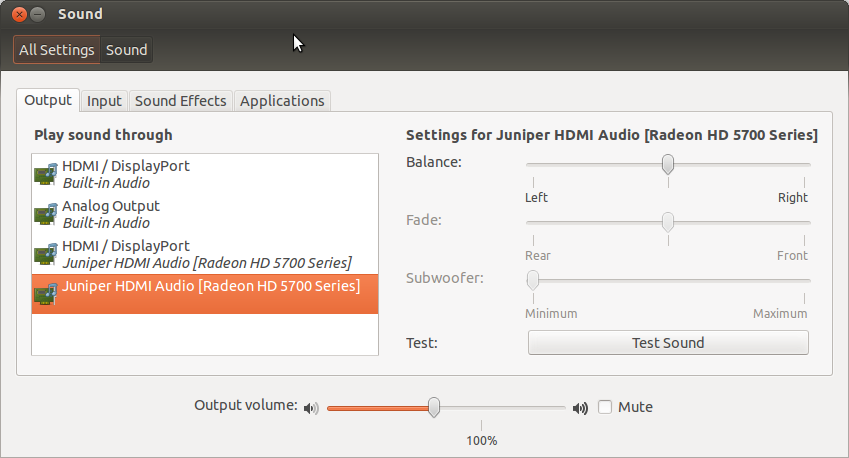
Open sound settings, you should see an HDMI Audio device here:
Testing HDMI audio device
First find your HDMI sound device, in this case card 1, device 3:
aplay -l
**** List of PLAYBACK Hardware Devices ****
...
card 1: Generic [HD-Audio Generic], device 3: HDMI 0 [HDMI 0]
  Subdevices: 1/1
  Subdevice #0: subdevice #0
The following file loads the devices:
/etc/pulse/default.pa
Test with aplay or with speaker-test (card 1, device 3):
aplay -D plughw:1,3 ~/Scripts/other/alarm.wav
speaker-test -c 2 -r 48000 -D hw:1,3
Make sure the card is not muted:
sudo apt-get install gnome-alsamixer
alsamixer
- F6 to select the device
- M to mute/unmute
